Blog
In a field that evolves daily, staying ahead means staying informed.
Explore in-depth articles designed to help you solve complex challenges,
maximize your machine’s ROI.
Stay ahead in a competitive market.


In a field that evolves daily, staying ahead means staying informed.
Explore in-depth articles designed to help you solve complex challenges,
maximize your machine’s ROI.
Stay ahead in a competitive market.
News | Mar-25-2026
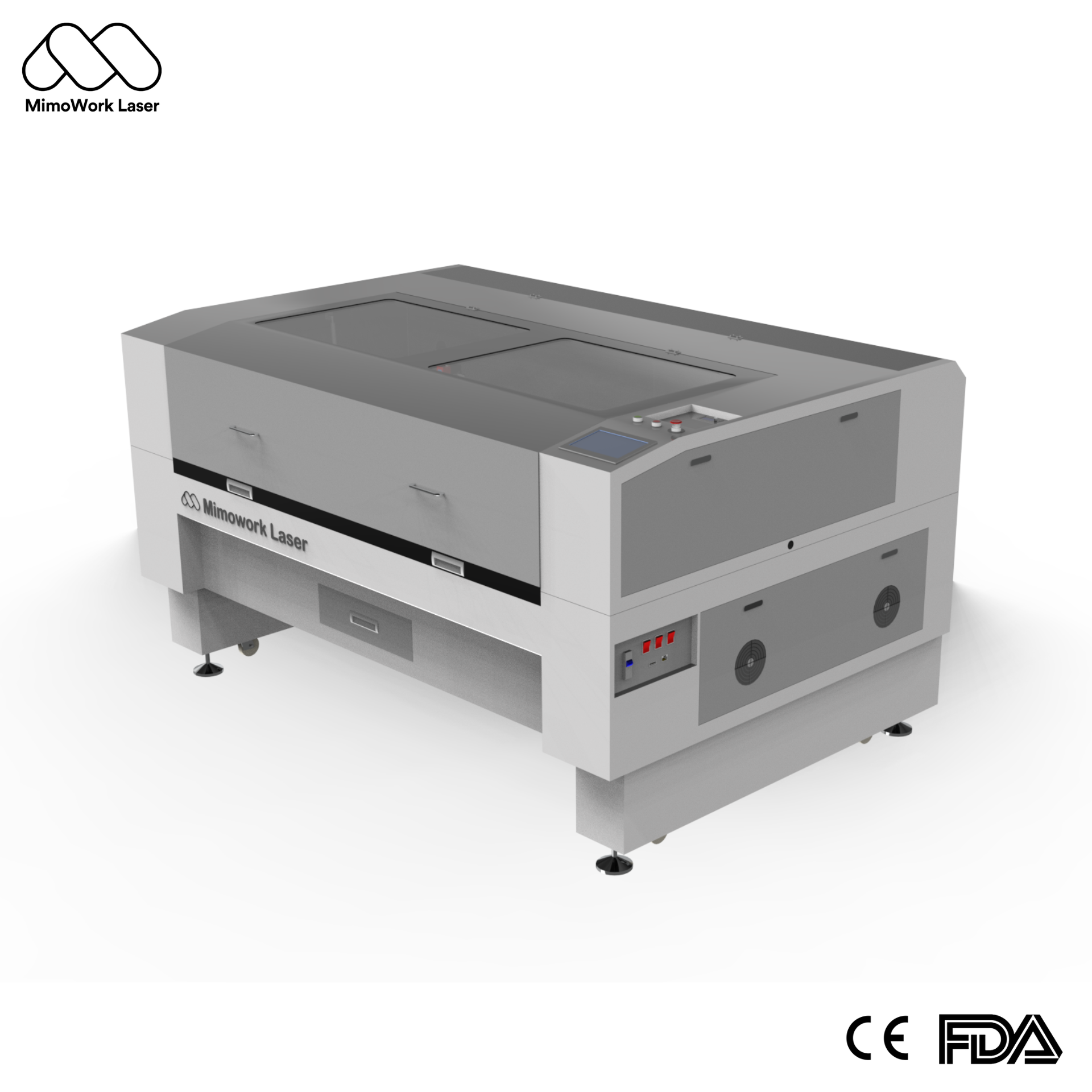
Shopping for a 100w co2 laser doesn’t have to be a headache. With countless models flooding the market, confusing technical specifications, and exaggerated marketing claims, many buyers feel lost from the very beginning. A significant number end up disappointed: some purchase underpowered units that struggle with daily tasks, while others overspend on fancy features they will never use.
The selection process can be much simpler. Start with this fundamental question:
What materials do you plan to cut and engrave most often?
If your projects primarily involve wood, acrylic, leather, fabric, paper, glass, and other non-metal materials, a 100w co2 laser is your best bet. It delivers exceptional performance across all these materials and offers the strongest return on investment.
If you focus mainly on metals like steel and aluminum, a fiber laser is the appropriate choice.
Once you clarify this key point, you simply need to verify whether other specifications align with your real production demands. This guide walks you through every step of selecting a 100w co2 laser, helping you find the right model and spend your budget wisely.
CO2 laser machines deliver power ranging from 40W to 300W. To choose the right one, simply evaluate what you work with day in and day out.
The 100w co2 laser sits right in the sweet spot of the mid-range category. It offers enough power to handle most commercial applications—from cutting 20mm acrylic to engraving dense hardwoods—while remaining cost-effective for small to medium businesses. For the vast majority of workshops, a 100w co2 laser represents the optimal balance between capability and affordability.
It’s wise to select a work surface slightly larger than your typical workpieces. This way, the machine won’t feel restrictive when you start accepting larger orders later on.
When evaluating a 100w co2 laser working area, consider not just your current project sizes but also your business growth trajectory over the next 2-3 years. A slightly larger bed today prevents the need for a costly machine upgrade tomorrow.
Working Area Comparison by Business Type
| Business Type | Recommended Working Area | Key Consideration |
|---|---|---|
| Hobbyists & Startups | 400×600mm to 600×900mm | Fits on standard workbenches; ideal for small batches. |
| Small Workshops | 1300×900mm | Handles standard sheet sizes; most popular choice. |
| Production Facilities | 1600×1000mm and above | Supports automated feeding for high-volume output. |
We recommend choosing equipment that works seamlessly with mainstream design programs including LightBurn, CorelDRAW, and AutoCAD. This approach means you won’t be forced to pay for costly memberships or adapt to unfamiliar design routines.
Quality modern machines also feature user-friendly control panels. Even first-time users can become comfortable with basic functions within one to two hours. Software that supports advanced features like variable power control and multi-layer processing can significantly expand your creative possibilities without requiring expensive third-party plugins.
Either purchase a machine with these systems included, or budget to add them on. The savings on maintenance and defective parts easily pay for themselves:
The 100w co2 laser tube life is directly influenced by the quality of these support systems. A properly cooled and maintained tube can last 8,000 to 10,000 hours, while a neglected tube may fail in a fraction of that time—making the upfront investment in these systems one of the smartest financial decisions you can make.
When you run a business with 100w co2 laser machines, reliable after-sales service matters far more than a low price tag. These are core production assets, and every single day they stop working directly hits your bottom line.
Take time to choose a reputable manufacturer. Ensure they have:
Steer clear of ultra-cheap unbranded units. If they break down and you cannot find parts or anyone to repair them, that expensive machine will end up sitting idle with no use at all.
The 100w co2 laser is one of the most versatile tools in any workshop. Its ability to process a wide range of materials makes it indispensable across multiple industries.
Wood is one of the most common materials processed by a 100w co2 laser. From intricate architectural models using thin plywood to robust furniture components from MDF, the 100W power delivers clean cuts with minimal charring. It is also an exceptional tool for detailed engraving, capable of producing stunning, high-contrast photographic images on hardwoods and softwoods alike. The 100w co2 laser cutting for wood application is widely adopted by sign makers, furniture manufacturers, and custom craft businesses.
In acrylic processing, the 100w co2 laser is unmatched. It delivers extremely fast cutting speeds and, more importantly, creates a polished, flame-like edge that is smooth, clear, and transparent. This eliminates the need for secondary finishing operations like flame polishing, saving both time and labor costs. For acrylic displays, signage, and artistic pieces, the 100W power level delivers the perfect balance of speed and edge quality.
The 100w co2 laser cutting for fabric is a game-changer in the textile industry. It precisely cuts cotton, polyester, nylon, spandex, and non-woven materials while simultaneously melting and sealing synthetic edges to prevent fraying. For leather, the 100W laser delivers sharp edges and depth-variable engravings, making it ideal for custom footwear, bags, belts, and artistic pieces.
While direct cutting is not possible, the 100w co2 laser engraving on stone and glass is highly effective. It creates permanent, high-contrast engravings for personalized gifts, memorial plaques, and architectural details through surface etching and marking.
Material Compatibility Table for 100W CO2 Laser
| Material Category | Typical Applications | Key Advantages | Important Notes |
|---|---|---|---|
| Wood (MDF, Plywood, Hardwood) | Cutting, engraving, furniture, signage | Clean edges, minimal charring, high detail | Requires air assist to reduce smoke and char |
| Acrylic (PMMA, Lucite) | Signs, displays, artistic pieces | Flame-polished edges, high speed | Excellent for up to 20mm thickness |
| Fabric (Cotton, Polyester, Nylon) | Garments, flags, technical textiles | Fray-free edges, precise cuts | Synthetic fibers seal during cutting |
| Leather (Full-grain, Suede) | Footwear, bags, belts, accessories | Sharp edges, depth-variable engraving | No physical dies required for complex patterns |
| Stone (Granite, Marble) | Memorial plaques, awards, signage | Permanent, high-contrast marking | Surface etching only, not cutting |
| Glass & Crystal | Awards, personalized gifts, decorative items | Frosted, durable marking | Requires specialized settings |
| Paper & Cardstock | Prototyping, invitations, packaging | Intricate cuts, clean edges, no tearing | Ideal for delicate, detailed work |
Based on years of industry experience and customer feedback, these are the most reliable, highest-value configurations for every use case. You can buy with confidence.
This system features a robust 100w co2 laser working area of 1600×1000mm, accommodating nearly all standard sheet materials. The optional conveyor feed system enables continuous roll-to-roll processing—a significant advantage for textile and flexible material applications. With a 100w co2 laser tube life of 8,000-10,000 hours under proper maintenance, this machine delivers reliable performance for years.
The vision positioning system is a standout feature for businesses handling printed fabrics or pre-printed materials. It eliminates manual registration errors and ensures perfect pattern alignment every time. For 100w co2 laser cutting for fabric in high-volume settings, this system delivers unmatched accuracy and efficiency.
This configuration is perfect for those who need the power of a 100W system without the footprint or cost of a full industrial unit. The compact design fits comfortably in small workspaces while still delivering the performance needed for commercial work. With its pre-installed support systems, this machine is ready to run immediately upon delivery.
Plenty of budget models claim to deliver certain wattage, yet actual power falls far short. Such units struggle to cut thick materials or produce consistent engraving results. You will likely need to replace the machine far earlier than expected, leading to greater financial losses over time. When evaluating a 100w co2 laser, always verify the laser tube’s actual output power and operating current specifications.
New business operators usually begin with small-scale jobs. As the business expands, larger orders will keep coming in. If you opt for a work area slightly larger than your current needs, you won’t have to invest in a whole new machine within one or two years. A 100w co2 laser working area that seems “too big” today often becomes “just right” tomorrow.
Trying to save a small sum by skipping the water chiller or air assist is never a smart move. Just a few months down the road, you may face broken laser tubes or damaged lenses. The replacement expenses will add up to a huge figure. For a 100w co2 laser system, a proper water chiller is not an option—it is a requirement. The 100w co2 laser tube life is directly proportional to cooling quality.
Some brands sell machines at a low upfront price, but their replacement tubes, lenses, and other components cost two to three times more than average. After three to five years of regular use, the extra spending will easily outweigh the money you saved at the start. Always check the price of consumable parts before making your purchase.
Answer: Generally, no. A 100w co2 laser is not designed for cutting standard metals like steel, stainless steel, or aluminum. The 10.6μm wavelength of a CO2 laser is not well absorbed by metallic surfaces, meaning most of the beam’s energy is reflected. Metal cutting is typically the domain of fiber lasers. However, a CO2 laser can mark certain metals that have a coating or an anodized layer, and some specialty applications use a CO2 laser with high-pressure oxygen assist to cut thin sheet metal, but this is a slow, specialized process.
Answer: A 100w co2 laser can process nearly all non-metal materials: wood, acrylic, leather, fabric, paper, rubber, glass, ceramic, and stone. With special settings, it can also mark coated metals and anodized aluminum. For 100w co2 laser cutting for fabric, it is particularly effective on synthetic materials due to its edge-sealing capability. For 100w co2 laser engraving on stone, it creates permanent, high-contrast markings on materials like granite and marble.
Answer: The 100w co2 laser tube life is not fixed; it primarily depends on your daily hours of usage and operational power settings. With proper maintenance and a reliable water chiller system, a high-quality glass tube can reliably last for 8,000 to 10,000 hours. To maximize tube life, always operate within the recommended current range, maintain the cooling system, and keep optical components clean. When replacement is eventually needed, the cost is manageable as a standard periodic maintenance consideration for long-term production value.
Answer: Choosing the right 100w co2 laser working area depends on your typical material sizes and production volume. For hobbyists and startups, a 600×400mm or 900×600mm area is sufficient. For small workshops handling standard sheets, a 1300×900mm area is the most popular choice. For high-volume production, consider 1600×1000mm or larger, which accommodates automated feeding systems. We recommend selecting a work area slightly larger than your current needs to accommodate business growth without requiring a machine upgrade within 1-2 years.
Answer: Absolutely. While a 100w co2 laser is a powerful industrial tool, modern machines feature intuitive control panels and software that make them accessible to beginners. Most users can learn basic operations—including setting up a job, adjusting power and speed, and running their first project—within 1 to 2 hours. Comprehensive video tutorials and ongoing technical support further simplify the learning curve. The key is choosing a machine with compatible software like LightBurn, which offers extensive learning resources and community support.
Choosing a 100w co2 laser doesn’t have to be complicated. Figure out what materials you work with first, match the power and 100w co2 laser working area to your production volume, ensure robust support systems are in place to maximize 100w co2 laser tube life, and pick a brand with reliable after-sales support. Whether you need the versatility for 100w co2 laser cutting for fabric, the precision for 100w co2 laser engraving on stone, or the power for thick wood and acrylic, the right machine is out there.
By avoiding the common mistakes outlined above—undercutting power, limiting workspace, skipping essential systems, and overlooking long-term part costs—you can make a confident investment that serves your business for years to come.
If you’re still not sure which 100w co2 laser model is right for you, explore the full lineup online or reach out directly. Tell us what you’re making, and we will provide a free, no-obligation recommendation to ensure you get the perfect machine for your business—no wasted budget required.
News | Mar-23-2026