Blog
In a field that evolves daily, staying ahead means staying informed.
Explore in-depth articles designed to help you solve complex challenges,
maximize your machine’s ROI.
Stay ahead in a competitive market.


In a field that evolves daily, staying ahead means staying informed.
Explore in-depth articles designed to help you solve complex challenges,
maximize your machine’s ROI.
Stay ahead in a competitive market.
News | Aug-20-2026
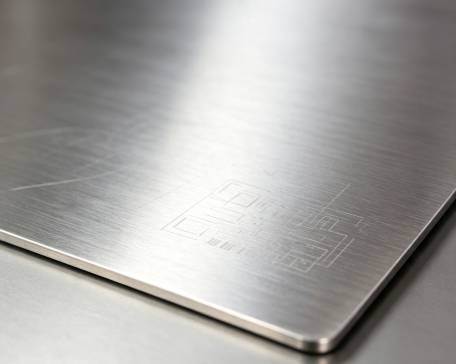
You have prepared your stainless steel part, focused the laser, and started the marking process. However, instead of a sharp and permanent mark, you only get a faint gray line, uneven contrast, or a mark that is difficult to see.
This is a common problem in stainless steel laser marking. A weak mark can affect product appearance, quality inspection, and traceability, especially when marking logos, serial numbers, QR codes, or product identification information.
In most cases, faint stainless steel laser marking is caused by four factors:
Understanding these causes will help you improve marking quality without unnecessary trial and error.
The laser source plays an important role in marking quality. Different wavelengths interact with stainless steel differently.
CO2 lasers are widely used for non-metal materials such as wood, acrylic, leather, and fabric.
However, stainless steel reflects much of the 10.6μm wavelength produced by CO2 lasers. Without a marking spray or coating, CO2 lasers generally cannot create permanent marks directly on stainless steel.
Diode lasers are a popular choice for entry-level engraving because of their lower cost.
However, stainless steel is more challenging to process with diode lasers due to their limited power output. Users may experience:
For professional metal marking applications, diode lasers are usually not the most efficient option.
A fiber laser marking machine is the standard solution for stainless steel.
Using a 1064nm wavelength, fiber lasers are highly effective on metals and can create permanent marks through:
Fiber lasers are commonly used for:
For most stainless steel marking applications, fiber laser technology provides the best combination of speed, precision, and reliability.
Even with the correct laser source, improper settings can result in faint marking.
The most important parameters include:
The goal is to deliver enough laser energy to create a clear mark without overheating the surface.
Power and speed work together.
If the marking speed is too high, the laser spends less time on the stainless steel surface. This can result in:
If the power is too low, the laser may not create enough surface change.
However, increasing power alone is not always the solution. Excessive energy can create rough surfaces or unwanted discoloration.
The best results come from finding the right balance between power and speed for your specific material.
Frequency controls how laser pulses overlap during marking.
Different frequency ranges can create different effects:
For black marking stainless steel, parameter adjustment is especially important because the laser needs to modify the surface oxide layer rather than simply remove material.
A focused laser beam creates the highest energy density.
If the focus position is incorrect, the laser spot becomes larger and the energy concentration decreases. This often results in:
Before marking stainless steel, check:
Proper focus is especially important for detailed applications such as small text, logos, and QR codes.
Surface preparation is often overlooked but has a direct impact on marking quality.
Oil, fingerprints, dust, and manufacturing residue can reduce laser absorption and create inconsistent results.
Before marking:
A clean surface allows the laser energy to interact directly with the stainless steel, improving marking consistency and contrast.
Stainless steel is not a single material. Different grades can produce different marking results.
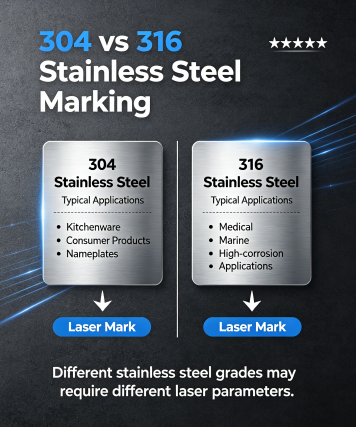
304 stainless steel is one of the most commonly marked materials.
Typical applications include:
It generally provides good marking results with standard fiber laser parameters.
316 stainless steel offers higher corrosion resistance and is commonly used for:
Because of its different composition, 316 stainless steel may require parameter adjustments to achieve the same contrast as 304.
Testing and saving material-specific presets can help maintain consistent production results.
Many users are looking for a black mark rather than a simple engraved line.
Black stainless steel marking is usually achieved through laser annealing.
Instead of removing material, the laser changes the oxide layer on the stainless steel surface, creating a dark appearance while keeping the surface smooth.
This process is commonly used for:
Achieving consistent black marks requires accurate control of:
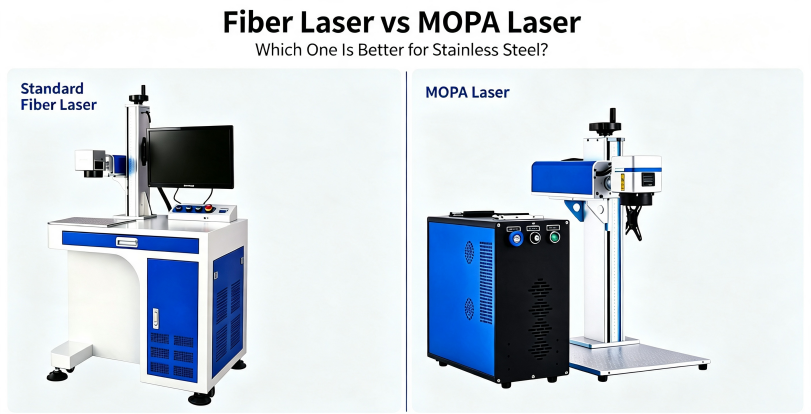
Both fiber laser and MOPA laser systems can mark stainless steel, but they are designed for different requirements.
A standard fiber laser marking machine is suitable for most industrial metal marking applications.
It is commonly used for:
For businesses that mainly need reliable and permanent stainless steel marking, a 20W, 30W, or 50W fiber laser provides excellent performance.
A 30W fiber laser is often the preferred choice for general marking because it balances speed, quality, and investment.
A 50W fiber laser is better suited for users who need:
A MOPA laser marking machine provides greater control over pulse width compared with standard fiber lasers.
This makes it especially useful for applications that require:
For example, premium consumer products and medical components often require both permanent marking and an attractive surface finish. MOPA technology provides more flexibility for these applications.
MimoWork offers both fiber laser and MOPA laser marking solutions to meet different stainless steel processing requirements.
Manufacturers use laser marking to create permanent identification marks on metal components.
Common applications include:
Unlike labels or ink printing, laser marks are permanent, wear-resistant, and suitable for industrial environments.
Customized stainless steel products are becoming increasingly popular.
Fiber and MOPA lasers can create:
The process requires no ink or consumables, making it suitable for both small customization businesses and larger production environments.
Medical tools require permanent identification without affecting material performance.
Laser marking is used for:
MOPA lasers are especially useful when applications require precise control and minimal surface impact.
The most common reasons are incorrect laser type, unsuitable parameters, poor focus, or surface contamination.
A fiber laser marking machine is the best choice for most stainless steel applications. MOPA lasers are recommended when advanced effects such as black marking or color marking are required.
Yes. A 30W fiber laser can handle common stainless steel marking applications including logos, text, QR codes, and product identification.
Not always. Standard fiber lasers are ideal for general metal marking, while MOPA lasers provide additional control for specialized applications.
If your stainless steel laser marking is faint or invisible, the problem is usually related to the laser source, processing parameters, focus, or material preparation.
For most metal marking applications, a fiber laser marking machine provides reliable and permanent results. For advanced applications requiring black marking, color effects, or finer control, a MOPA laser marking machine offers additional flexibility.
By selecting the right laser technology and optimizing your settings, you can achieve clear, durable, and professional-quality stainless steel marks for industrial production and customized products.
News | Aug-11-2026
News | Jul-30-2026