Blog
In a field that evolves daily, staying ahead means staying informed.
Explore in-depth articles designed to help you solve complex challenges,
maximize your machine’s ROI.
Stay ahead in a competitive market.


In a field that evolves daily, staying ahead means staying informed.
Explore in-depth articles designed to help you solve complex challenges,
maximize your machine’s ROI.
Stay ahead in a competitive market.
News | Aug-20-2026
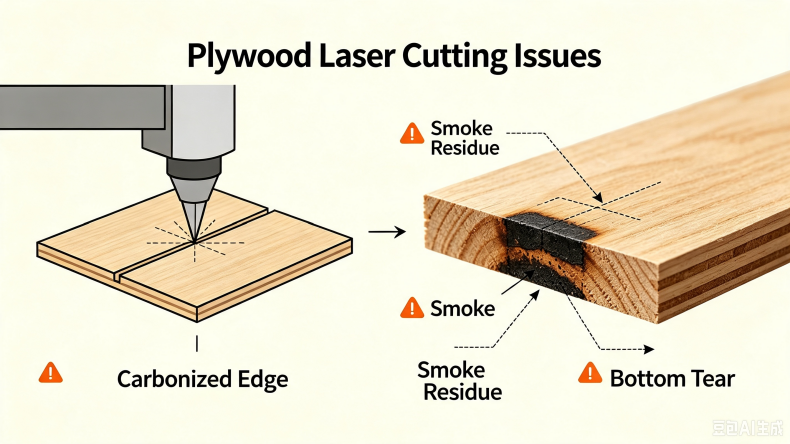
Laser cutting plywood should produce clean, smooth edges, but many users experience the same problems: blackened edges, excessive smoke marks, or plywood that refuses to cut through completely.
These problems are usually not caused by the wood itself, but by a combination of factors including plywood quality, glue layers, laser power, cutting speed, and air assist settings.
Understanding why plywood burns or fails to cut through will help you optimize your plywood laser cutting process and achieve cleaner results with less material waste.
Unlike solid wood, plywood is made from multiple layers of veneer bonded together with adhesive. During laser cutting, the laser must cut through both natural wood fibers and glue layers, which behave differently under heat.
The most common reasons for burned plywood edges include:
When the laser moves too slowly, the beam stays on the same area for too long. Excess heat accumulates around the cutting path, causing:
Increasing cutting speed while maintaining enough laser power can reduce heat buildup and create cleaner edges.
A successful plywood laser cutting process depends on finding the right balance between laser power and cutting speed.
Too much power with slow speed creates unnecessary heat, while insufficient power leaves uncut areas or rough edges.
Typical CO2 laser cutting recommendations:
| Plywood Thickness | Recommended Laser Power | Cutting Approach |
| 3mm plywood | 60W–80W CO2 laser | Higher speed, single pass |
| 6mm plywood | 80W–100W CO2 laser | Medium speed, strong air assist |
| 9mm–12mm plywood | 130W+ CO2 laser | Lower speed or multiple passes |
Higher-power CO2 laser cutters allow faster cutting speeds, which helps reduce burning during production.
If your laser cuts the top layer but leaves the bottom layer attached, the problem is usually related to material density, machine settings, or beam performance.
The biggest challenge when cutting plywood is often the adhesive between layers.
Construction plywood may contain:
These adhesives can absorb laser energy and create more smoke instead of clean vaporization.
For better results, choose laser-friendly plywood such as:
A desktop laser cutter may handle thin plywood well but struggle with thicker boards.
For example:
Choosing the right laser power prevents repeated passes, which often increase burning.
A laser beam must remain tightly focused to deliver enough energy density.
Common issues include:
Regularly cleaning optics and checking focus accuracy helps maintain consistent cutting performance.
Many users assume that laser cutting is only suitable for thin plywood sheets. However, with the right laser power and optimized parameters, high-power CO₂ laser cutters can process much thicker plywood materials.
For example, MimoWork tested thick plywood cutting with a 300W CO₂ laser cutter, successfully cutting 11mm plywood with clean and precise edges. The demonstration shows how higher laser power, proper airflow, and optimized cutting settings help reduce burning while improving cutting efficiency.
Watch the test here:
Can Laser Cut Thick Plywood? Up to 20mm
This type of high-power laser solution is especially suitable for applications such as woodworking, furniture components, signage, and custom plywood projects where thicker materials need to be processed efficiently.
Air assist plays an important role in clean plywood cutting.
A strong airflow helps:
For plywood applications, a reliable air assist system is especially important when working with thicker sheets.
The working table affects the final cutting quality.
A honeycomb working bed improves ventilation under the material and helps prevent:
Applying low-tack masking tape before cutting can reduce smoke stains on the plywood surface.
This is especially useful for decorative products, signs, and crafts where appearance matters.
Plywood is one of the most common materials processed by CO2 laser cutters because the wavelength is highly suitable for organic materials such as:
For businesses producing wooden signs, furniture components, crafts, or customized products, selecting a machine with enough power and a stable motion system is essential.
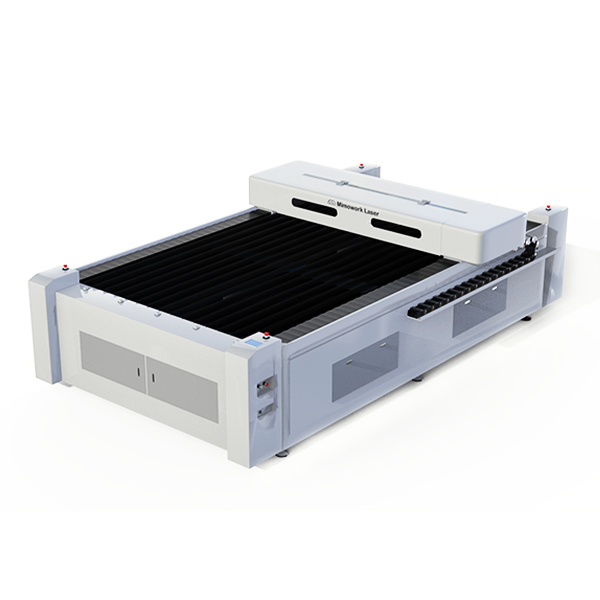
MimoWork CO2 laser cutters are designed for wood processing applications, offering different working sizes and power options to match various plywood thicknesses and production requirements.
Yes. A CO2 laser cutter is commonly used for cutting plywood because it can precisely vaporize wood fibers and create detailed designs. The cutting quality depends on plywood type, thickness, laser power, and settings.
For most plywood applications, 60W–150W CO2 laser cutters provide a good balance between cutting ability and production efficiency. Thin plywood requires less power, while thicker sheets need higher wattage.
Black edges are usually caused by excessive heat, slow cutting speed, poor air assist, or plywood containing difficult-to-cut adhesives. Adjusting speed, airflow, and material selection can significantly reduce burning.
Plywood can be easier to process than some solid woods because it has consistent thickness and a flat surface. However, the glue layers inside plywood can sometimes make cutting more challenging.
Successful laser cutting plywood requires the right combination of material selection, machine power, cutting parameters, and airflow control.
If your plywood burns or does not cut through, check the basics first: choose laser-friendly plywood, increase airflow, optimize speed and power settings, and ensure your CO2 laser cutter has enough power for the material thickness.
With the right setup, plywood laser cutting can produce clean edges and consistent results for woodworking, signage, crafts, and industrial applications.
News | Aug-7-2026
News | Jul-30-2026
News | Jul-28-2026