Blog
In a field that evolves daily, staying ahead means staying informed.
Explore in-depth articles designed to help you solve complex challenges,
maximize your machine’s ROI.
Stay ahead in a competitive market.


In a field that evolves daily, staying ahead means staying informed.
Explore in-depth articles designed to help you solve complex challenges,
maximize your machine’s ROI.
Stay ahead in a competitive market.
News | May-27-2026
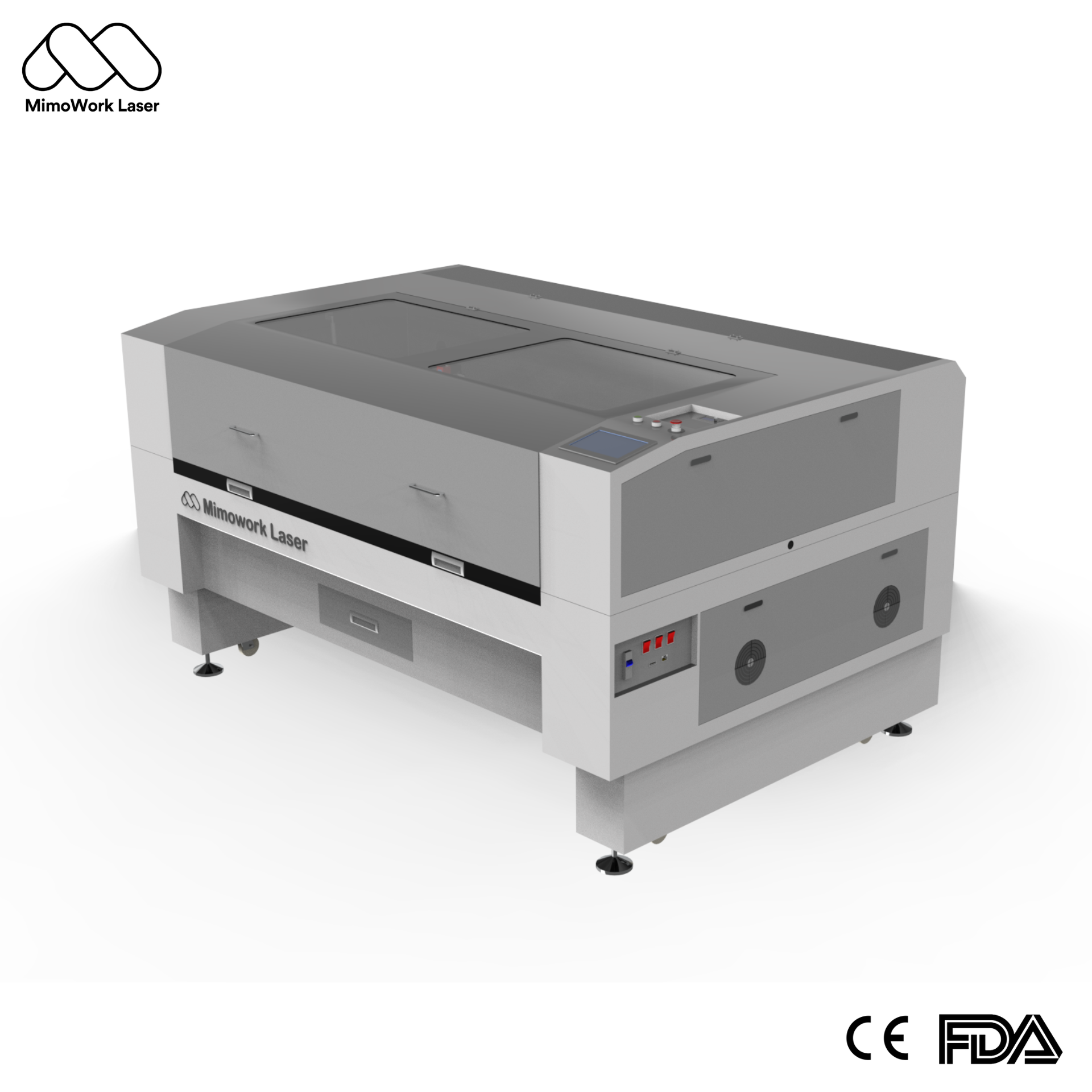
Wood engraving requires stable control and clean, consistent results. Even modest adjustments in speed or power can impact the depth, contrast, and finish of the surface. A good laser engraver for wood helps you to be consistent without repeated trial and error. With a reliable machine, you will get more accurate designs, cleaner cuts, and consistent results for both single and batch production.
Many users encounter issues such as burnt edges, inconsistent shading, or low detail quality. Problems generally arise from machine mismatch or incorrect settings, not from the substrate itself. In this guide, you will learn how to choose the best laser engraver for wood in 2026. You will also learn how to choose the right configuration for your specific requirements.
CO2 laser systems are widely used in wood processing. The reason is that wood absorbs CO2 laser energy very efficiently, resulting in a clean surface. Moreover, CO2 wavelength processes wood better compared to other laser types. The reliability of CO2 laser engraving machines makes them a popular choice for both small workshops and industrial settings.
CO2 laser engraving equipment works at a round 10,600nm wavelength. This wavelength is particularly efficiently absorbed by wood. The CO2 laser wood engraver provides you with smooth cuts, sharp borders, and intricate engravings with very little heat spread.
These lasers operate between 5W and 20W. They are slower and can also result in uneven burn patterns on thicker materials. They are not suitable for deep engraving but work well for light hobby projects.
You don’t have to invest in multiple machines. Just like a wood cutting laser machine, a CO2 laser system can handle engraving, cutting, and etching. There is a difference between these three processes.
Etching: This removes only the top layer of the wood. You can use it for creating logos and fine-line artwork.
The type of wood has a direct impact on the quality of engraving. The result of the laser engraver for wood relies on density, texture, and adhesive layers.
Here are different types of wood that work best for laser engraving:
MDF is very consistent and easy to work with.
Plywood entails glued-up ply sheets and needs balanced settings.
The results of engraving on solid wood are naturally varied.
Bamboo is of high density and needs careful settings.
| Type Of Wood | Quality of Engraving | Ease of Cutting | Power Level | Important Notes |
| MDF | Very High | Easy | Medium | Ideal for precise details |
| Plywood | High | Medium | Medium to High | Glue layers need attention |
| Solid Wood | Medium-High | Medium | Adjustable | Grain variations can impact output |
| Bamboo | High | Hard | Controlled High | Careful tuning is required |
Choosing the right machine is about more than price. Your production volume, material type, engraving detail, and working speed all affect which system will work best for you. A machine designed for hobby use may struggle with long production hours or thicker wood materials. Before buying an industrial laser engraver, you should compare the following specifications carefully.
Laser power directly affects engraving depth and cutting capability. Lower-power machines are suitable for light engraving and thin wood sheets, while higher-power systems can cut thicker materials and complete jobs faster.
Most industrial CO₂ laser machines range from 60W to 150W. A 60W system is often enough for detailed engraving and thin wood cutting. Higher wattage becomes more useful when you process hardwood, thick plywood, or large production batches.
Engraving accuracy determines how sharp and clean the final design looks. DPI, or dots per inch, controls image detail and shading quality.
Higher DPI settings produce smoother gradients, clearer text, and better photo engraving results. This is especially important for logos, decorative artwork, and detailed patterns on wood surfaces.
The machine bed size should match your typical project size.
Small working areas are practical for:
Larger working areas are better for:
Choosing the correct working area helps reduce material repositioning and improves workflow efficiency.
Scanning speed affects production output and engraving efficiency. Faster systems complete jobs in less time while maintaining engraving quality.
For businesses handling large orders, stable high-speed engraving helps reduce production delays and improve consistency across batches.
Most wood laser engraving machines support software such as LightBurn or RDWorks. These programs allow you to control speed, power, layers, and engraving paths.
Before purchasing a machine, you should confirm that the software works smoothly with your design workflow and file formats.
Wood laser processing creates smoke, dust, and burnt particles. Without proper extraction, residue can affect engraving quality and reduce machine performance over time.
A good smoke evacuation system helps:
Improve engraving clarity on wood surfaces
Keep the work area cleaner
Protect optical components
Reduce maintenance needs
When you’re making wood items at volume, an industrial laser engraver provides you with much more than simply high power. Here is what actually changes when you switch from an entry-level machine to an industrial system.
Each item comes out identical. No operator mistakes from product to product. This is really imperative when you are fulfilling an order for 600 engraved plaques or 1200 laser-cut panels.
The laser will never have physical contact with wood. This means there is no clamping force or blade pressure, reducing the chances of damaging fragile panels. Laser processing neatly cuts through thin veneers and complex fretwork that is often shattered under a router blade of traditional wood engraving tools.
Send your digital file directly to the machine. It cuts or engraves exactly what you drew — no molds, no tooling changes, no setup cost. You can switch designs in seconds.
Industrial machines can integrate with automated loading and unloading systems, enabling continuous operation with little manual intervention. This lowers labor costs and increases throughput on large orders.
MimoWork offers more than standard laser machine manufacturing. Our equipment supports:
Software customization – interfaces are adaptable and can be adjusted to your workflow
Vision positioning systems – the camera scans the registration marks on the material and automatically aligns the laser.
Automatic loading and unloading – full conveyor integration for hands-free batch manufacturing.
Custom working area sizes – to match your exact production line dimensions.
MimoWork designs machines for robust wood processing and scalable production. You can choose an ideal option as per your requirement:
MimoWork F Series is a core wood laser cutting machine. It is designed for everyday use in production environments. Here are its key features:
F100 Laser Cutter
The F100 laser cutter machine is intended for high-precision cutting and clear engraving on wood. It is designed to do intricate work with steadiness and precision.
Here are its key features:
C Series Fume Extractors
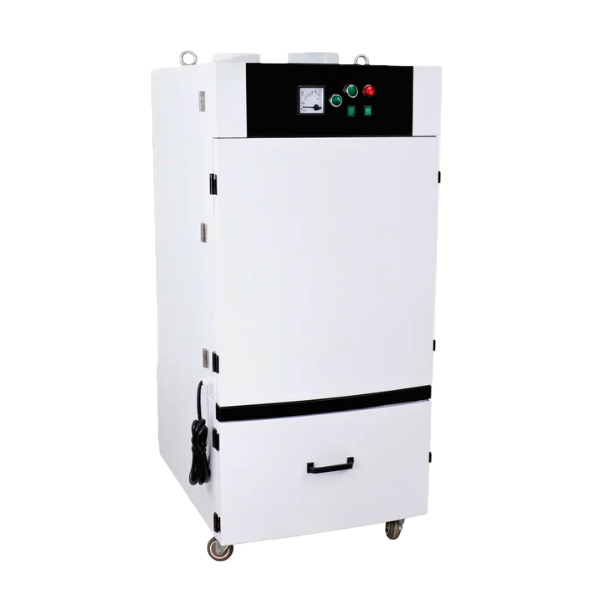
Laser processing of wood produces smoke, fine dust, and carbon dust. MimoWork C Series fume extractors offer multi-stage filtration. They can be connected directly to MimoWork laser machines. Moreover, they can be adjusted to suit the airflow requirements of each model.
A laser engraver for wood supports multiple industries.
Used for scaled prototypes and planning models.
Used for texture-based engraving and relief designs.
Correct tuning of the laser engraver can improve output quality.
| Thickness | Power Requirement | Speed Requirement |
| 3mm MDF | 40–50W | 20–25mm/s |
| 6mm Plywood | 55–65W | 15–18mm/s |
| 12mm Solid Wood | 80–100W | 10–12mm/s |
| 18mm MDF | 100–120W | 8–10mm/s |
To prevent burn marks and charring on wood:
Engraving depth depends mostly on the laser power, pace, and number of passes. Higher power and slower movement provide deeper engraving. Lower power and faster movement create lighter surface marks and finer detail.
Higher DPI can increase sharpness, but it also takes a lot of time. The following are the best DPI settings for sharper detail:
300 DPI: Works for standard text, logos, and basic patterns
500 DPI: Best for detailed illustrations, portraits, and fine-line artwork
1000 DPI: Give photographic-quality engravings on smooth MDF or bamboo
A clean, level surface provides you with sharper and more uniform engravings. Follow these steps to prepare wood:
Knowing how to choose the right wood laser cutter machine saves you from costly mistakes later. Consider the factors given below before making any decision.
A mid-range machine with a moderate working surface is good for small-scale work or one-off custom projects. However, batch production requires a large-format machine with automation support.
Most CO₂ lasers can do both. Just ensure the power is sufficient for your thickest material.
Ventilation is not optional; it is a must for safe operation. Verify the machine is equipped with exhaust systems venting outside or an inline fume extractor.
Before making a purchase, map out how the machine will intake materials and move them to the next step. It should be integrated into production lines using conveyor inputs, standard software interfaces, and customizable dimensions.
MimoWork provides free sample testing. You send us the material, we run it on our engraving machines, and send you the results. That eliminates the guesswork in your buying decision. Our engineering staff also assists with process verification so you know exactly what to expect from day one.
Most industrial CO2 laser machines engrave MDF and plywood up to 18–20mm in a single pass.
Yes, even the best quality engraving machine results in harmful fumes. A quality fume extractor and adequate ventilation are required in the workspace.
MimoWork machines support AI, SVG, DXF, PNG, and JPEG file formats.
Industrial machines are more powerful, offer large working surfaces, are faster, and can be automated. Maker-grade machines are designed for occasional use in small workplaces.
Reach out to MimoWork through email or WhatsApp. You can also submit a free quote request.
The ideal laser engraver for wood relies on your material, your volume, and your production system. MimoWork manufactures industrial CO2 laser engravers that are tested, adaptable, and backed by experienced engineering support.
Contact MimoWork today to submit a quote request or ask about sample testing. Our engineers are here to help you choose the right configuration of a Laser engraver for wood.
News | May-14-2026
News | Apr-24-2026
News | Apr-24-2026
