Blog
In a field that evolves daily, staying ahead means staying informed.
Explore in-depth articles designed to help you solve complex challenges,
maximize your machine’s ROI.
Stay ahead in a competitive market.


In a field that evolves daily, staying ahead means staying informed.
Explore in-depth articles designed to help you solve complex challenges,
maximize your machine’s ROI.
Stay ahead in a competitive market.
News | Oct-21-2026 | Mimowork
Quick Answer
• For wood: A CO₂ laser is usually the better choice for detailed engraving, signs and compatible wood cutting.
• For bare metal: A fibre laser is generally more suitable for marking stainless steel, aluminium and other compatible metals.
• For both: Compare a dual-source machine with two dedicated lasers based on your actual workload, changeover time and production requirements.
Yes, but the important question is whether it can deliver the results you need on both materials.
Wood and metal absorb laser energy differently. A typical CO₂ laser operates at around 10.6 μm, a wavelength that organic materials such as wood absorb effectively. This makes it suitable for producing detailed patterns, text, logos and recessed engravings. With the right configuration, it can also cut compatible wood sheets.
A typical fibre laser operates near 1,064 nm and is widely used for metal marking and engraving. Its interaction with metal makes it suitable for applications such as serial numbers, QR codes, logos and component identification.
This difference explains why a machine that engraves plywood beautifully may struggle with bare stainless steel, while a fibre laser designed for metal marking may produce inconsistent, charred results on wood.
There are exceptions. A CO₂ laser can mark certain metals using a compatible marking compound, and specialised laser configurations may support more than one material. However, these processes are not interchangeable with direct metal engraving.
Before choosing a machine, define what you want to produce on each material. Engraving a wooden sign and applying a shallow logo to a metal plate are very different jobs from cutting thick wood and deeply engraving stainless steel.
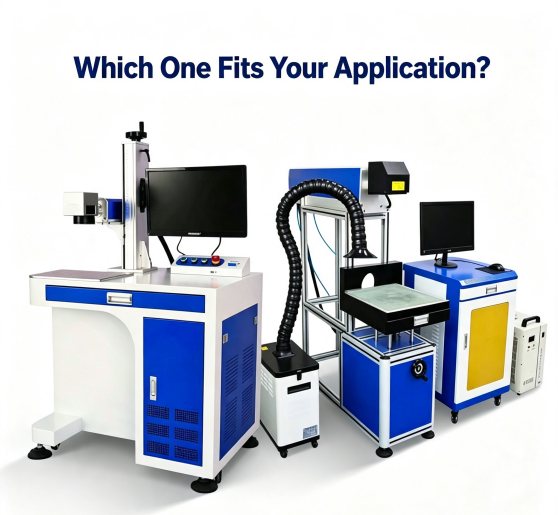
The best option depends on the material, the required finish and how often you run each type of job.
| Feature | CO₂ Laser | Fibre Laser |
| Wood engraving | Well suited to detailed designs | Generally not the preferred choice |
| Wood cutting | Suitable for compatible wood sheets | Generally unsuitable for conventional wood cutting |
| Bare metal marking | Usually requires a compatible marking compound | Well suited to many metal marking applications |
| Deep metal engraving | Not suitable for direct engraving of bare metal in a standard configuration | Possible with suitable power, pulse characteristics and processing parameters |
| Typical applications | Wooden signs, gifts, decorative panels | Metal nameplates, tools, serial numbers and traceability codes |
| Main buying consideration | Tube type, working area, focus, air assist and extraction | Laser power, pulse characteristics, marking field, optics and required engraving depth |
Neither technology is universally better. A CO₂ laser may be the more practical investment for a wood-focused workshop, while a fibre laser makes more sense for a business producing metal identification marks every day.
If you process both materials, the next question is whether a combined system will genuinely save time and money.
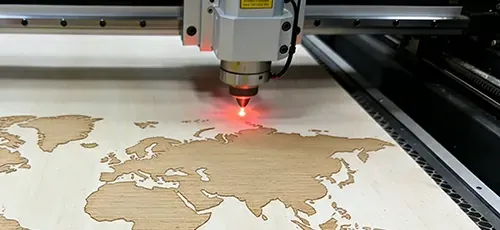
CO₂ laser systems are commonly used to produce wooden signs, decorative panels, nameplates, photo frames and customised gifts.
The advantage is flexibility. You can change the artwork without creating new physical tooling, making the process suitable for personalised orders and short production runs.
Plywood, MDF, hardwood, softwood and bamboo can all be considered, but they will not necessarily produce the same results. Grain, resin, moisture, adhesives and surface coatings affect engraving contrast and edge quality.
If you plan to cut as well as engrave, check the maximum material thickness you actually need to process. A machine that handles detailed surface engraving well may not deliver the same cutting speed or edge quality on thicker stock.
For these applications, explore MimoWork’s laser cutting solutions and compare the available configurations against your material size and production needs.
Fibre lasers are widely used to mark stainless steel, aluminium and other compatible metals for product identification.
However, not every metal mark is the same.
• Annealing marking: Uses controlled heating to change the surface colour, producing a black mark on suitable stainless steel without intentionally removing material.
• Surface etching: Removes or modifies a shallow surface layer to create a mark.
• Deep engraving: Removes more material to create a measurable recess.
• Coating removal: Removes a compatible coating, such as a marking layer or anodised surface, to reveal a contrasting area underneath.
These distinctions matter when choosing equipment. A dark mark is not necessarily a deep engraving, and a machine that produces excellent serial numbers may not be the best option for deep engraving tools or metal components.
If your parts require a specific engraving depth, ask the supplier to demonstrate that depth on your actual material. Do not rely on a photograph of a dark, high-contrast mark as proof of material removal.
Some businesses manufacture wooden display boards with metal nameplates, personalised gifts with metal accessories, or decorative products combining both materials.
For occasional metal work, a wood-focused workshop may find it more economical to outsource metal marking or use a separate compact fibre marker. If both materials generate regular orders, a dual-source machine or two dedicated systems may be worth evaluating.
The right choice depends on the number of jobs, how frequently you switch materials and whether both processes need to run at the same time.
A dual-source laser engraver sounds convenient: two laser technologies in one machine, with less floor space required. But convenience alone does not determine whether it is the better investment.
A dual-source system may simplify purchasing and reduce the need for two complete workstations. However, you should confirm whether switching between sources requires changing fixtures, refocusing, adjusting settings or recalibrating the setup. Each source may also have a different usable work area or processing speed.
Two independent machines require more space and usually a larger combined initial investment. In return, each machine can be configured for its main application, and separate jobs can run without competing for the same workstation.
Here is a practical way to decide:
Choose a CO₂ laser first if most of your revenue comes from wooden signs, gifts and decorative products, with only occasional metal orders.
Consider a fibre laser first if most of your work involves metal identification, serial numbers, logos or industrial components.
Compare a dual-source machine if both materials are regular parts of your business, but space is limited and your workflow can accommodate changeovers.
Consider two dedicated machines if wood and metal jobs both run frequently, require different work areas, or need to be processed simultaneously.
Do not assume a dual-source machine is automatically less reliable or more expensive to maintain. Request a breakdown of the source specifications, shared components, maintenance schedule, warranty and service costs before comparing quotations.
Instead of comparing every machine specification, start with the requirements that could make a purchase unsuitable.
1. Specify the actual material. “Wood” and “metal” are not detailed enough for equipment selection. Identify the wood species, metal grade, thickness, coating and surface finish. These details influence the process and the final result.
2. Define the finish you need. For wood, decide whether you need a light engraving, dark contrast, fine detail or through-cutting. For metal, specify whether you need a black annealed mark, surface etching, coating removal or deep engraving.
3. Match the machine to the workpiece. Check the usable working area, focusing method and positioning system. A galvo fibre marker is often suited to fast marking within a defined field. A motorised-axis or gantry configuration may be more appropriate for larger workpieces or certain deep-engraving applications.
For CO₂ systems, compare glass-tube and RF-excited configurations where available. They differ in cost, control characteristics and maintenance requirements, so the better choice depends on the application and the manufacturer’s specifications.
4. Check the supporting equipment. For wood, pay attention to air assist, extraction and fire prevention. For metal, confirm the required enclosure, laser safety controls and suitability of the optics and laser source. A machine’s headline power rating does not tell you whether the complete setup is appropriate for your workshop.
5. Test the job before committing. This is where a supplier’s claims become useful—or fall short. Ask for a sample made from your material, using your artwork and target finish.
For wood, check engraving contrast, edge charring, cutting quality and consistency. For metal, check mark readability, surface damage and actual depth if deep engraving is required. Run several samples to see whether the results remain consistent.
Also ask for the settings used, processing time and configuration details. These provide a more useful basis for comparing machines than a demonstration piece alone.
MimoWork offers laser processing solutions for different material applications. When discussing a potential configuration, prepare your material details, workpiece dimensions, target finish and expected production volume. This helps narrow down the equipment options that are relevant to your work.
Visit the MimoWork website to explore its laser processing solutions.
Certain laser marking compounds allow a CO₂ laser to create a visible mark on compatible metal surfaces. The result depends on the compound, substrate and processing conditions. This method should not be confused with direct metal engraving, and it needs testing for contrast, durability, cleaning requirements and production consistency.
Not necessarily in every case, but power is an important factor. The required depth, metal type, pulse characteristics, scan strategy and number of passes all affect processing time and quality. Ask for a test that measures actual depth and cycle time on your intended material.
It may be a durable surface mark, but it is not necessarily an engraving in the material-removal sense. Annealing changes the surface colour through controlled heating, whereas deep engraving creates a physical recess. Choose the process according to the product’s durability and identification requirements.
It can be operated safely only with appropriate equipment and procedures. Wood is combustible, and laser processing can generate smoke and potentially hazardous emissions. Use suitable extraction, follow the machine manufacturer’s air-assist requirements, maintain fire precautions and never leave an operating laser unattended.
Choosing a laser engraver for wood and metal comes down to the work you need to produce, not simply whether a machine claims to handle both materials.
CO₂ lasers are generally the practical choice for wood engraving and cutting, while fibre lasers are widely used for bare-metal marking and engraving. For mixed-material businesses, a dual-source machine can offer flexibility, but separate systems may make more sense when both workflows are frequent or require different configurations.
Before purchasing, define the required finish, test your actual materials and compare the complete workflow—including setup time, maintenance and production consistency. A well-matched machine will do more for your business than a configuration that looks versatile on paper.
Related guide:Laser Engraver for Wood and Metal: How to Choose the Right Machine for Your Business
News | Oct-20-2026
News | Sep-14-2026