Blog
In a field that evolves daily, staying ahead means staying informed.
Explore in-depth articles designed to help you solve complex challenges,
maximize your machine’s ROI.
Stay ahead in a competitive market.


In a field that evolves daily, staying ahead means staying informed.
Explore in-depth articles designed to help you solve complex challenges,
maximize your machine’s ROI.
Stay ahead in a competitive market.
News | Nov-21-2026 | Mimowork
The best CO2 laser cutter for home use is not necessarily the cheapest or most powerful machine. It should match the materials you work with, the size of your projects, and the amount of space available in your workshop.
For beginners and home-based makers, a 60W desktop CO2 laser with a 600 × 400 mm working area is a practical starting point. MimoWork‘s F60 fits this category. However, anyone planning to turn a hobby into a regular business should also consider a larger working area before making a purchase.
The biggest mistake is buying a machine that works for your first few projects but becomes a production bottleneck six months later.
The problem usually starts with comparing specifications instead of comparing actual work.
A beginner might see a 100W machine and assume it must be better than a 60W model. Another buyer may choose the smallest machine because it costs less and takes up less space. Both decisions can lead to unnecessary compromises.
Consider someone starting a small personalized-gift business. Their first products might be wooden keychains, acrylic ornaments, and engraved coasters. A compact machine can handle these jobs comfortably. But once orders increase, they may want to produce larger signs, cut multiple pieces in one batch, or work with bigger acrylic sheets.
Suddenly, the original working area becomes the problem.
This is why choosing the best CO2 laser machine requires looking beyond wattage. Three specifications have a much greater impact on everyday use: working area, laser power, and the machine’s ability to handle your production workload.
A good purchase should solve today’s problems without unnecessarily restricting tomorrow’s opportunities.
A good home machine should make everyday production easier, not create a new set of technical problems.
Not necessarily. A compact machine saves installation space, but a small working area can limit product dimensions and batch production.
For example, a 600 × 400 mm bed is suitable for many personalized gifts, small wooden decorations, acrylic accessories, and craft projects. It also allows users to arrange several smaller designs on one sheet.
However, producing larger signs or decorative panels may require repeated material repositioning. This wastes time and can make alignment more difficult.
The important distinction is between machine size and usable production space. Before purchasing, measure your largest expected workpiece, not just the products you make today.
For general home applications, 60W can offer a useful balance between cutting and engraving. Moving to 80W or 100W may improve cutting capability and processing efficiency for certain materials, but higher wattage does not automatically produce better engraving quality.
Material type, thickness, focal position, optics, and processing speed all influence the result.
A buyer mainly engraving wooden gifts and cutting relatively thin acrylic may not benefit enough from additional power to justify a larger investment. Someone regularly processing thicker materials or handling larger orders may find that additional power provides valuable production headroom.
The goal is not to buy the highest wattage available. It is to avoid paying for capacity that will remain unused.
This is one of the most overlooked purchasing considerations.
Cutting wood, acrylic, leather, and other materials produces smoke, particles, and potentially hazardous emissions. A home workshop needs a properly designed exhaust or suitable filtration system, along with appropriate fire protection.
Cooling is another consideration. CO2 glass laser tubes require a suitable cooling arrangement, and MimoWork’s F60 and F100 configurations specify water chillers.
A machine may fit physically in your garage, but that does not mean the installation is ready for operation. Buyers should confirm electrical requirements, exhaust routing, cooling equipment, access for maintenance, and applicable local safety requirements before ordering.
For many first-time buyers, 60W is enough to start. An 80W configuration becomes more attractive when cutting requirements and production frequency increase.
The difference is easier to understand through actual working scenarios.
| Comparison | 60W CO2 Laser | 80W CO2 Laser |
| General engraving | Suitable | Suitable |
| Small craft projects | Suitable | Suitable |
| Thin-material cutting | Suitable, material-dependent | Suitable, material-dependent |
| More demanding cutting jobs | May require slower processing or multiple passes | More processing headroom |
| Small-batch production | Practical | More flexibility for demanding workloads |
| Initial investment | Generally lower | Depends on configuration |
There is no universal cutting-thickness limit that applies to every 60W or 80W machine. Even two machines with identical rated power can produce different results because of their optics, tube performance, mechanical systems, and material conditions.
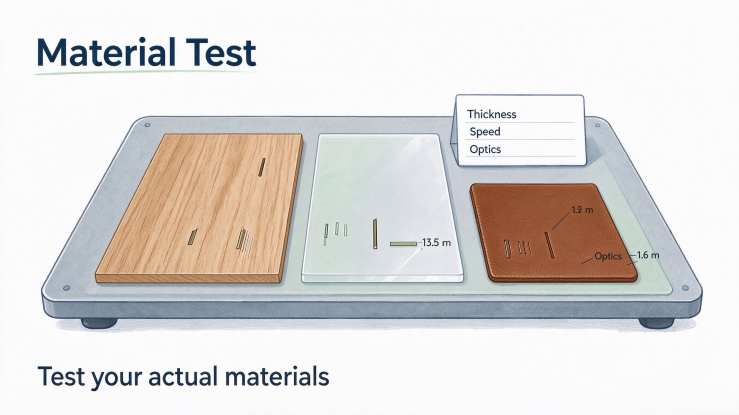
For this reason, ask manufacturers for actual cutting samples using your intended material. A demonstration on thin plywood does not prove that a machine will perform equally well on thicker plywood or a different acrylic formulation.
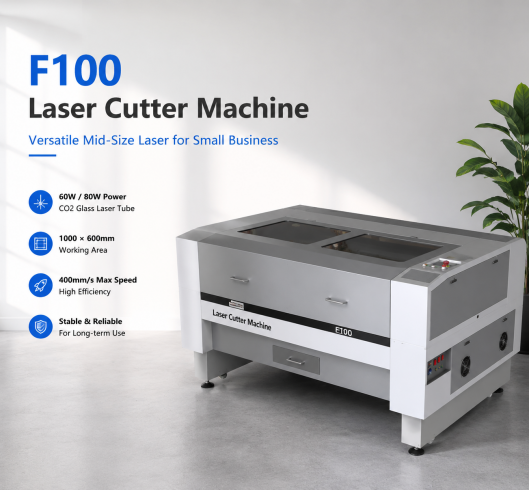
MimoWork’s F60 and F100 illustrate two different stages of workshop development. The F60 focuses on compact applications, while the F100 provides more room for larger products and growing orders.
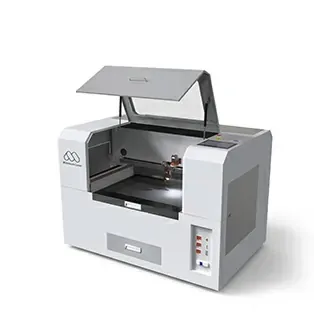
The MimoWork F60 Desktop Laser Cutter is designed for home workshops, hobby users, and smaller creative businesses.
It comes with a 60W CO2 glass laser tube and a 600 × 400 mm working area. Its maximum speed is listed at 400 mm/s, with a water chiller specified in the technical configuration.
What makes this machine worth considering is its balance between processing capability and application size.
Imagine a maker producing personalized wooden photo frames, acrylic keychains, leather accessories, and small decorative products. These jobs generally do not require a large industrial cutting bed. A 600 × 400 mm workspace can provide enough room for individual products and small production batches.
The F60 is therefore a sensible candidate for someone entering laser processing without immediately committing to a larger production system.
However, buyers should check the actual installation dimensions rather than assuming that a desktop-category machine will fit on an ordinary household desk.
The MimoWork F100 Laser Cutter takes a different approach.
Its working area increases to 1,000 × 600 mm, with 60W and 80W configurations available. It also supports LightBurn, making it worth considering for users who want a more flexible design and production workflow.
The additional workspace is the main advantage.
For example, a small business producing acrylic signage may start with individual nameplates and personalized gifts. As demand grows, larger signs and multiple orders become more common. With a 600 × 400 mm bed, some jobs may require dividing designs or repositioning materials. The F100 offers more room to arrange larger pieces and multiple designs within one working session.
Notice that the F100 is not simply a more powerful version of the F60. Its larger working area changes what you can produce efficiently.
That distinction matters when choosing between the two models.
| Specification | F60 | F100 |
| Working area | 600 × 400 mm | 1,000 × 600 mm |
| Laser power | 60W | 60W / 80W |
| Laser source | CO2 glass tube | CO2 glass tube |
| Maximum speed | 400 mm/s | 400 mm/s |
| Cooling | Water chiller | Water chiller |
| Best suited to | Home makers and small projects | Growing workshops and small businesses |
My recommendation: Start by comparing the F60 and F100 according to your largest regular workpiece. If most of your products fit comfortably within 600 × 400 mm, the F60 deserves serious consideration. If you already anticipate larger products or regular batch production, the F100 may save you from upgrading too soon.
A machine upgrade makes sense when your current equipment starts limiting the business rather than simply because a newer model has higher specifications.
There are three common signs.
The first is repeated material repositioning. When larger products no longer fit the cutting bed, you spend more time arranging and aligning jobs instead of processing them.
The second is increasing order volume. A machine that handles five customized orders comfortably may become inefficient when you need to process dozens of products every day.
The third is a change in product category. Moving from small gifts to large wooden signs, acrylic displays, or more demanding production applications can require a different working area and power configuration.
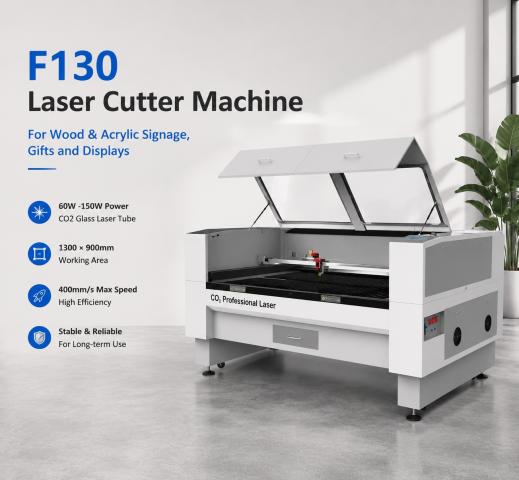
For these users, a larger machine such as MimoWork’s F130, which offers a 1,300 × 900 mm working area and 60W–150W power options, may be worth evaluating.
The important point is that upgrading should follow a real production requirement. Buying a large industrial machine for occasional home crafts can create unnecessary costs in space, installation, and maintenance.
A home CO2 laser cutter can become a useful business asset when you have products that customers are willing to pay for and enough recurring work to justify owning the equipment.
Personalized gifts, custom signage, wooden decorations, acrylic displays, and small-batch craft products are common starting points.
But machine ownership does not automatically make a business profitable. You still need to account for material waste, design time, packaging, shipping, maintenance, electricity, and marketing.
A useful way to evaluate the investment is to calculate the actual cost per finished product.
For example, a personalized acrylic sign may require only a small amount of material, but the final cost also includes design preparation, test cutting, finishing, and labor. A faster machine can help, but only when processing time is genuinely limiting your output.
For beginners, outsourcing a few jobs before purchasing can also reveal which materials, product sizes, and order quantities are worth investing in.
Yes. A 60W CO2 laser can cut compatible acrylic and wood materials. Actual thickness and edge quality depend on material composition, machine condition, optics, and processing parameters.
It can be worthwhile when you regularly cut thicker compatible materials or need more processing headroom. For occasional engraving and smaller projects, the additional power may not provide enough practical benefit.
A garage can be a suitable location if it provides sufficient space, proper exhaust, cooling, electrical supply, and fire protection. The installation must follow the manufacturer’s requirements and local safety regulations.
Tube lifespan varies with tube quality, operating current, cooling conditions, usage frequency, and maintenance. Buyers should ask about rated operating life, warranty coverage, replacement availability, and recommended operating conditions rather than relying on a single universal lifespan figure.
Choosing the best CO2 laser cutter for home use is ultimately about understanding how your work will develop.
The F60 makes sense for makers who need a compact machine for smaller products and limited production volumes. The F100 is more attractive when larger workpieces and growing orders become part of the plan.
Neither machine is automatically the better choice. The real difference is how much working space and production flexibility you need.
Before making a decision, ask for sample cuts using your actual materials, compare the complete installation requirements, and calculate the cost of maintaining the machine over time.
Looking for a CO2 laser machine for your home workshop or growing business? Send MimoWork your material type, maximum workpiece dimensions, expected cutting thickness, and estimated daily workload. The team can evaluate the F60, F100, or a different configuration and help arrange material testing before you invest.
Related guide: Understanding the 80 Watt CO2 Laser
News | Oct-27-2026
News | Oct-13-2026